

RF calculators are small tools that apply the standard RF design formulas to numbers you enter: power unit conversions, VSWR and return loss, trace impedance, cascaded noise figure, path loss, link budgets, matching networks and attenuators. This page indexes every calculator on the site, explains what each one computes and which formula it uses, and links to the full article behind it.
Each calculator sits inside a page that derives its equations and works an example by hand, so the result can be checked rather than taken on trust. A set of quick converters for the most frequent conversions is at the bottom of this page. The collection belongs to the RF design tools section of the RF design guide.
Calculator index
Units and power
- dB, dBm, dBW and dBc converter: converts between watts, milliwatts and logarithmic units with P(dBm) = 10log(P/1 mW). The starting point for every other calculation.
Transmission lines and matching
- VSWR, return loss and mismatch loss calculator: converts between VSWR, |Γ|, return loss and mismatch loss using |Γ| = (VSWR − 1)/(VSWR + 1).
- Microstrip impedance calculator: finds characteristic impedance and effective permittivity from trace width, substrate height and dielectric constant, or the width needed for a target impedance.
- Impedance matching calculator (L, Pi, T): computes component values that match a complex load to a source at one frequency, with the network Q.
Noise and receivers
- Cascaded noise figure (Friis) calculator: combines stage gains and noise figures with F = F1 + (F2 − 1)/G1 + …, showing why the first stage dominates.
Propagation and link budgets
- Free-space path loss calculator: evaluates FSPL = 20log(4πd/λ) for a distance and frequency.
- RF link budget calculator: adds transmit power, antenna gains, losses and path loss, then compares the received level with receiver sensitivity to give the link margin.
Passive components
- Pi and T attenuator calculator: gives resistor values for a matched attenuator of a chosen loss in a chosen impedance.
How the calculators fit together
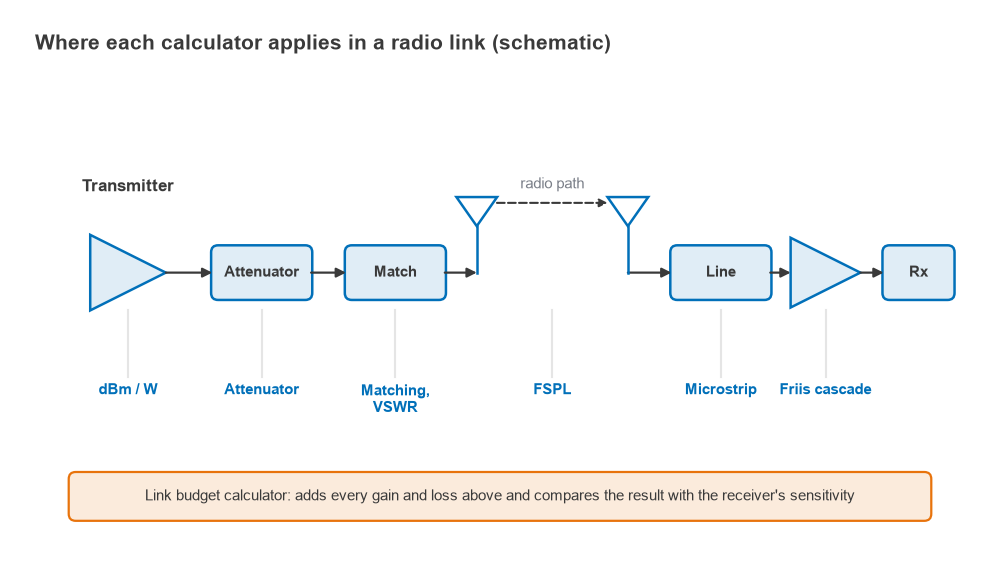
The calculators are not independent. A radio link passes through almost every one of them, from the power amplifier’s output in dBm, through an attenuator and a matching network, out of an antenna, across a path, and back through a transmission line and a cascade of receiver stages. The link budget calculator collects all of those numbers into one sum.
Worked example: one link, five calculators
A 2.4 GHz link runs over 1 km of clear line of sight with a 20 dBm transmitter, 2 dB of cable and attenuator loss, a 6 dBi transmit antenna and a 3 dBi receive antenna. The receive antenna has a VSWR of 2:1.
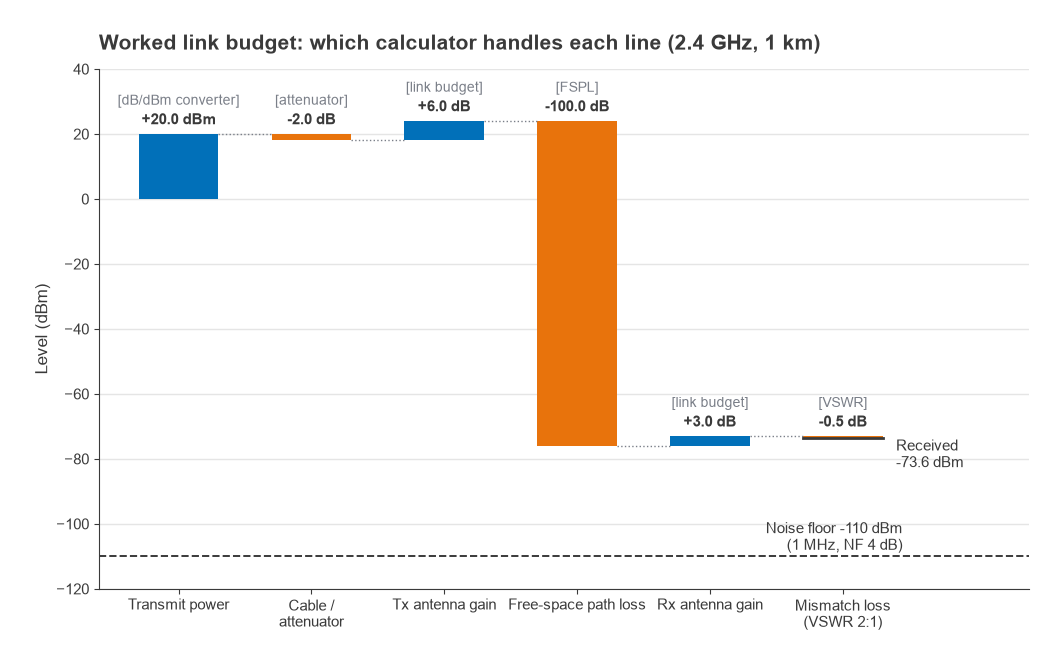
- Free-space path loss: FSPL = 20log(dkm) + 20log(fMHz) + 32.45 = 0 + 67.60 + 32.45 = 100.05 dB.
- Mismatch loss: |Γ| = (2 − 1)/(2 + 1) = 0.333, so the loss is −10log(1 − 0.3332) = 0.51 dB.
- Received power: 20 − 2 + 6 − 100.05 + 3 − 0.51 = −73.6 dBm.
- Receiver noise floor in 1 MHz with a 4 dB noise figure: −174 + 60 + 4 = −110 dBm.
- SNR: −73.6 − (−110) = 36.4 dB, which is ample for most modulations before fading margin is subtracted.
The noise floor term comes from the thermal noise and kTB page, and the SNR each modulation needs is tabulated on the SNR and Eb/N0 page. Radio Architectures Part 15 builds the same budget for a complete radio, including fade margin.
Quick converters
These three converters cover the conversions engineers make most often. Each uses the same formula as the full calculator page it links to. Results are rounded for display.
With the default values the converters reproduce the worked example: 20 dBm is 100 mW, a 2:1 VSWR gives 9.54 dB return loss and 0.51 dB mismatch loss, and 1 km at 2400 MHz gives 100.05 dB of free-space path loss.
Using calculators well
A calculator is only as good as the model behind it. The microstrip formulas are closed-form approximations that are typically accurate to within a few percent for ordinary geometries, but they ignore solder mask and the frequency dependence of dielectric constant. The matching calculator assumes ideal components with no parasitics, and the FSPL result assumes clear line of sight with no ground reflection. Each calculator page states its assumptions next to the inputs. When a design is close to a limit, follow the calculator with a circuit or EM simulation; the free RF design software list covers no-cost options, and RF simulation software compared covers the commercial suites. For steady-state nonlinear problems that no calculator handles, see harmonic balance vs transient simulation.
Some problems are easier to solve graphically than numerically, particularly matching with distributed elements. The Smith chart guide shows how the matching calculator’s answers look on the chart.
Frequently asked questions
Where can I find RF calculators?
Every calculator on this site is listed in the index above, grouped by topic, with a link to the page that explains its formula. Quick converters for dBm, VSWR and free-space path loss are on this page itself.
Are online RF calculators accurate enough for design?
They are accurate enough for first-pass sizing and for checking simulation results. Final designs should be confirmed by simulation with real component models and by measurement, since calculators leave out parasitics and layout effects.
Related topics
Definitions of the terms used by the calculators are collected in the wireless terms glossary. For the theory behind the transmission line calculators, start with the transmission line theory introduction.