

A link budget calculator is a tool that adds up every gain and loss between a transmitter and a receiver to predict the received power, then compares it with the receiver’s sensitivity to give the link margin. To calculate a link budget by hand, start from transmit power, add antenna gains, subtract cable losses and free-space path loss to get received power, then subtract the sensitivity, which is the thermal noise floor plus noise figure plus the required SNR. A positive margin means the link closes.
This tool accompanies The RF Link Budget, which explains each term in depth, and belongs to the radio architectures section of the RF design map. Enter your values below, or read on for the formulas and a worked example.
RF Link Budget Calculator
The calculator assumes free-space propagation between the antennas. Use the “other losses” field for anything else in the path, such as polarization mismatch, body loss, rain or an obstruction allowance, and the “required fade margin” field for the extra margin you want held in reserve.
| EIRP | – |
| Free-space path loss | – |
| Received power Pr | – |
| Noise floor (kT0B + NF) | – |
| Receiver sensitivity | – |
| SNR at the receiver | – |
| Link margin | – |
| Margin above required fade margin | – |
| Free-space range for zero margin | – |
| Free-space range with required fade margin | – |
Formulas Used
Every quantity is in decibel units, so the budget is a sum. The dB and dBm page covers the conversions if they are unfamiliar.
- EIRP = Pt − Lt + Gt (dBm), where Lt is the cable and connector loss between the transmitter and its antenna.
- Free-space path loss = 20log(dkm) + 20log(fMHz) + 32.45 dB, the Friis result for isotropic antennas, explained on the free-space path loss page.
- Received power Pr = EIRP − FSPL − Lother + Gr − Lr (dBm).
- Noise floor N = −174 + 10log(BHz) + NF (dBm). The −174 dBm/Hz figure is kT0 at T0 = 290 K, rounded from −173.98; see thermal noise (kTB) and noise figure.
- Sensitivity S = N + SNRreq (dBm), as derived in receiver sensitivity.
- Link margin M = Pr − S (dB).
- Free-space range for a target margin Mt: d = d0 × 10(M − Mt)/20, because free-space loss rises by 20 dB per decade of distance.
The required SNR depends on the modulation, coding and the error rate you need, and is usually taken from a modem datasheet or from the Eb/N0 curves discussed in SNR and Eb/N0. The noise bandwidth is the receiver's equivalent noise bandwidth, which is close to, but not always equal to, the channel bandwidth. For a multistage receiver, use the cascaded noise figure from Friis's formula referred to the antenna terminal, which is why the Rx cable loss is entered separately here: if your noise figure already includes the cable, set the Rx cable loss to zero to avoid counting it twice.
Worked Example: 2.4 GHz Link Over 1 km
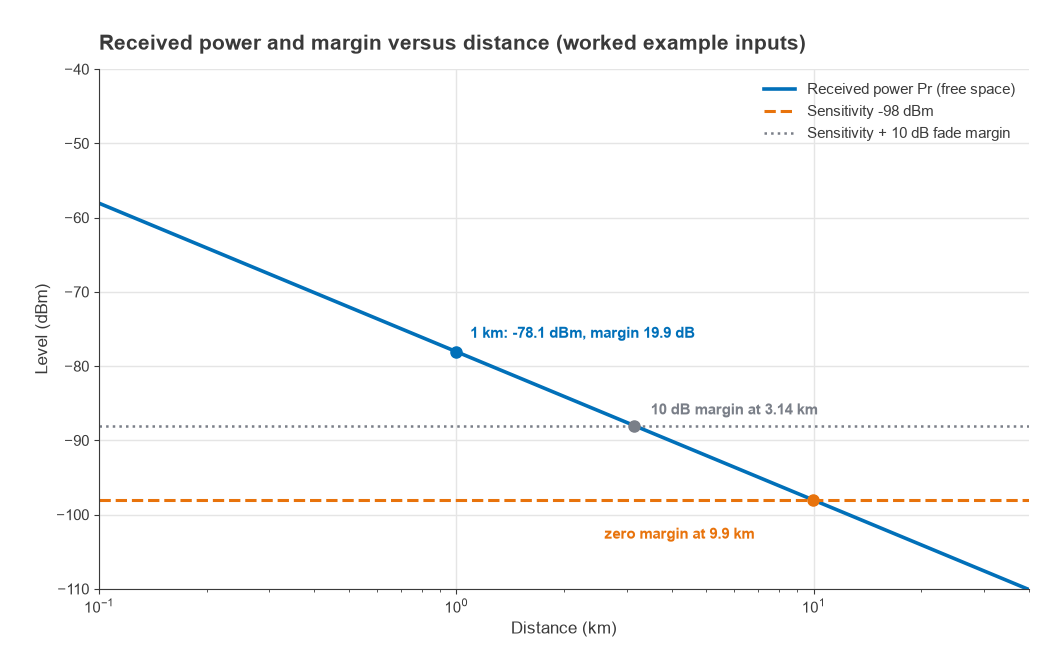
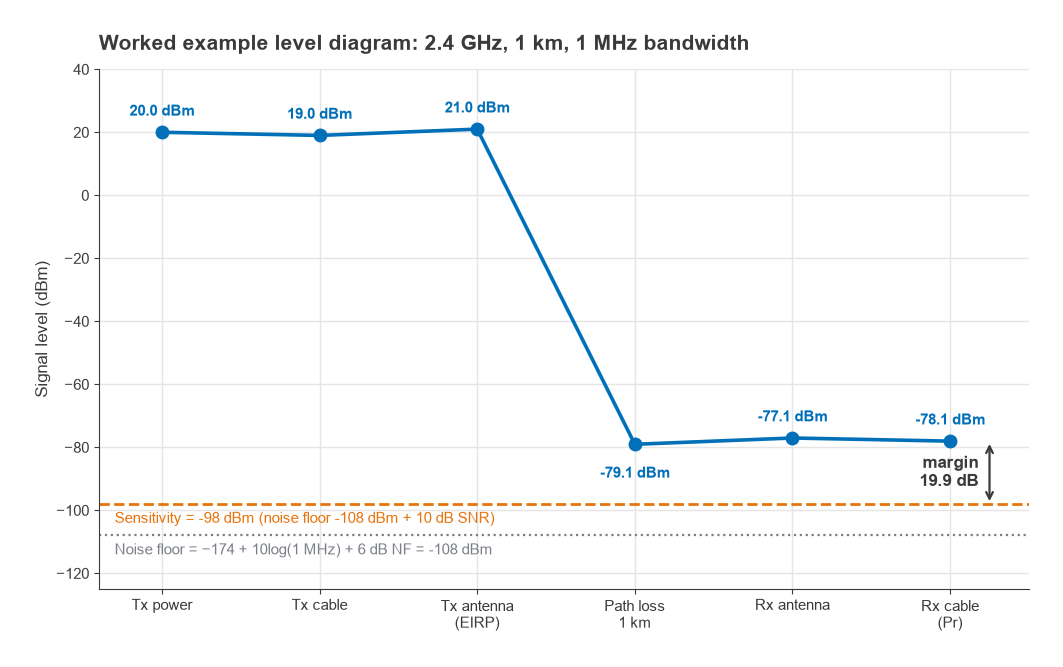
The calculator's default values describe a simple 2.4 GHz data link: 20 dBm transmit power, 2 dBi antennas at each end, 1 dB of cable loss at each end, a 1 MHz noise bandwidth, a 6 dB receiver noise figure and a modem that needs 10 dB SNR.
| Line | Calculation | Result |
|---|---|---|
| Transmit power | given | +20.0 dBm |
| Tx cable loss | given | −1.0 dB |
| Tx antenna gain | given | +2.0 dBi |
| EIRP | 20 − 1 + 2 | +21.0 dBm |
| Free-space path loss | 20log(1) + 20log(2400) + 32.45 | −100.05 dB |
| Rx antenna gain | given | +2.0 dBi |
| Rx cable loss | given | −1.0 dB |
| Received power | 21 − 100.05 + 2 − 1 | −78.05 dBm |
| Noise floor | −174 + 60 + 6 | −108.0 dBm |
| Sensitivity | −108 + 10 | −98.0 dBm |
| SNR at receiver | −78.05 − (−108) | 29.95 dB |
| Link margin | −78.05 − (−98) | 19.95 dB |
| Range at zero margin | 1 km × 1019.95/20 | 9.94 km |
| Range with 10 dB fade margin | 1 km × 109.95/20 | 3.14 km |
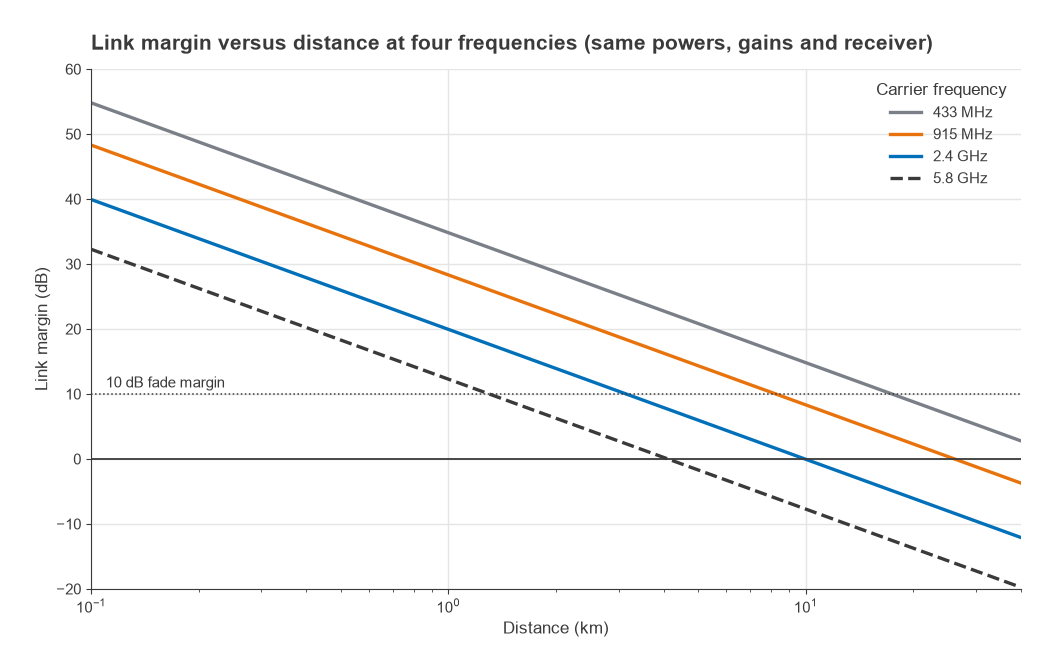
The link closes at 1 km with almost 20 dB to spare. In free space it would still work at about 9.9 km, but no real link should be planned at zero margin. Holding 10 dB in reserve for fading and other uncertainties brings the planning range down to about 3.1 km. If the same hardware were moved to 5.8 GHz, the path loss at 1 km would rise by 20log(5800/2400) = 7.7 dB and the 10 dB-margin range would shrink to about 1.3 km; at 915 MHz it would grow to about 8.2 km. That frequency dependence holds for fixed antenna gains. With fixed antenna aperture instead, higher frequencies gain back the difference through higher antenna gain, a point developed in antenna parameters.
Accuracy and Limits
The calculator is exact for its free-space model, and that model is the main limitation. Real paths differ from free space in several ways:
- Fresnel zone obstruction. Terrain, buildings or trees inside the first Fresnel zone add loss even when the path is visually clear. The RF Link Budget shows how to size the clearance.
- Ground reflection and distance exponent. Near the ground, loss often rises faster than 20 dB per decade beyond a breakpoint distance, so the range estimate here is optimistic for low antennas. Radio propagation basics covers the alternatives.
- Fading. Multipath and shadowing make the received level vary with time and position; the fade margin is the allowance for that.
- Interference. The noise floor here is thermal only. A noisy band or a co-located transmitter raises it.
Typical fade margins vary widely with the environment and the required availability. A fixed line-of-sight link might be planned with something like 10 to 20 dB, while a mobile or indoor link may need more; treat these as starting points rather than rules.
Frequently asked questions
How do I calculate a link budget?
Add transmit power and antenna gains, subtract cable losses, path loss and other losses to get the received power. Subtract the receiver sensitivity, which is −174 dBm/Hz + 10log(bandwidth) + noise figure + required SNR. The difference is the link margin; it should exceed the fade margin your environment needs.
Why does the calculator use 32.45 in the path loss formula?
It is 20log(4π/c) with distance in kilometres and frequency in megahertz. With distance in metres and frequency in hertz the constant becomes −147.55 dB; both give the same result.
What fade margin should I use?
It depends on the path, the environment and the availability you need. Line-of-sight fixed links are often planned with roughly 10 to 20 dB, and links with heavy multipath or mobility need more. Measured data from a similar site is the best guide.
Related topics
Read The RF Link Budget for the full explanation behind this tool, and the radio architectures hub for the rest of the series, starting with Part 1. More tools are collected under RF calculators, and terms are defined in the wireless terms glossary.