

Free RF design software is the set of no-cost circuit simulators, electromagnetic solvers and analysis libraries that cover most of the RF design process without a commercial licence. No single free tool is best at everything. For RF circuit and S-parameter simulation, Qucs-S and QucsStudio are the usual starting points; for electromagnetic work, Sonnet Lite handles planar structures and openEMS handles full 3D problems; scikit-rf ties simulated and measured data together in Python.
This list is aimed at students, hobbyists and engineers who need a tool outside their employer’s licence pool. It describes what each tool does, where its limits are, and how the tools fit together on a real project. Licensing and feature details change, so the descriptions here reflect the projects as of late 2026; check each project’s own site before relying on a specific capability. For the commercial suites, see RF simulation software compared. This page sits under the RF design tools hub.
How to judge a free RF tool
RF design uses several different kinds of simulation, and a tool that is excellent at one may not do the others at all:
- Circuit simulation solves lumped and distributed networks: DC bias, AC and transient (SPICE-type), and S-parameter and noise analysis for RF. Nonlinear steady-state analysis, such as harmonic balance, is a further step; see harmonic balance vs transient simulation.
- Planar EM simulation solves currents on flat metal layers over a layered dielectric, which suits microstrip filters, couplers and PCB interconnects.
- 3D full-wave EM simulation solves Maxwell’s equations in a volume, needed for antennas, connectors, enclosures and anything that is not flat.
- Data analysis reads, cascades, de-embeds and plots Touchstone files from simulators and network analyzers.
Questions worth asking of any free tool: is it open source or only free to use, which operating systems it runs on, whether problem size is capped, whether it imports and exports Touchstone files, and whether there is an active user community. The EM simulation basics page explains the solver types in more depth.
The tools
Qucs-S
What it is: an open-source schematic-driven circuit simulator descended from the original Qucs project. It uses interchangeable simulation back ends, including ngspice and Xyce for SPICE-type work and the original Qucs engine (Qucsator) for RF analyses such as S-parameters. Strengths: a good teaching tool for matching networks, filters and small-signal amplifier design, with Smith chart and polar plots built in and cross-platform builds. Limits: no electromagnetic solver; the RF device model library is small compared with commercial suites, so transistor work usually depends on vendor SPICE or S-parameter models.
QucsStudio
What it is: a separate, independently developed descendant of Qucs by Michael Margraf. It is freeware rather than open source. Strengths: it extends the circuit simulator with system-level simulation, a PCB electromagnetic simulation capability and links to scripting in Octave and C/C++, which makes it one of the more ambitious free RF environments. Limits: closed source, a smaller user community than the open projects, and fewer third-party tutorials. Check the current documentation for which analyses and platforms are supported.
ngspice and LTspice
What they are: ngspice is an open-source SPICE engine used inside Qucs-S and KiCad and also usable on its own. LTspice is a freeware SPICE simulator distributed by Analog Devices. Strengths: fast, well-documented transient and AC simulation, large model libraries, ideal for bias networks, oscillators, power supplies and baseband circuits. Recent versions of ngspice include an S-parameter analysis. Limits: SPICE is a time-domain and small-signal tool; it handles distributed elements and S-parameter data less naturally than an RF simulator, and long transient runs are needed to see steady-state behaviour of high-Q RF circuits.
Sonnet Lite
What it is: the free, feature-limited version of Sonnet’s planar method-of-moments EM solver. It requires registration, and its main restriction is the memory available to each simulation, which caps how finely a structure can be meshed. Strengths: accurate analysis of planar circuits in a shielded box, which suits microstrip and stripline filters, stubs, couplers and short interconnects; the same interface as the commercial product. Limits: the memory cap rules out large or finely detailed layouts, and as a planar solver it does not model arbitrary 3D shapes. Windows is the primary platform.
openEMS
What it is: an open-source 3D full-wave solver based on the finite-difference time-domain (FDTD) method, with geometry described through the CSXCAD library and driven from Octave, MATLAB or Python scripts. Strengths: no size cap other than the computer’s memory and time, broadband results from a single run, and a good fit for antennas, transitions and PCB structures. Limits: no graphical model editor of the kind commercial tools have; the user writes the geometry and mesh in code. Mesh quality is the user’s responsibility, and getting it wrong is the most common source of bad results.
MEEP
What it is: an open-source FDTD package that originated at MIT, scripted in Python. Strengths: well documented and flexible, with strong support for periodic structures and dispersive materials. Limits: its community is centred on photonics, so RF-specific conveniences such as lumped ports and S-parameter extraction take more setup than in openEMS.
NEC-2 and 4nec2
What it is: NEC-2 is a long-established method-of-moments code for antennas made of thin wires, and 4nec2 is a free Windows front end for it. Strengths: quick and well proven for dipoles, Yagis, loops and wire arrays, including ground effects. Limits: wires only. Patch antennas, dielectric substrates and PCB antennas need a planar or 3D solver instead.
scikit-rf
What it is: an open-source Python library for RF network analysis. Strengths: reads and writes Touchstone files, cascades and de-embeds networks, converts between S, Z, Y and ABCD parameters, plots on Smith charts, and implements VNA calibration algorithms. It is the natural place to compare a simulation with a measurement. Limits: it is a library, not a simulator with a schematic; circuits are built in code from network objects. The Python for RF engineers page gives a tutorial, and the Touchstone files page explains the format it reads.
KiCad
What it is: an open-source schematic and PCB layout suite with an integrated ngspice simulator. Strengths: it produces manufacturing files, handles multilayer boards and controlled-impedance traces, and its geometry can be exported for EM analysis. Limits: it is not an RF simulator. Trace impedances still have to be computed separately, for example with the microstrip calculator.
Capabilities at a glance
The matrix summarises the list above. “Partial” means the capability exists but through an add-on, a back end or with significant limits. It is a simplification; each project’s documentation is the authority.
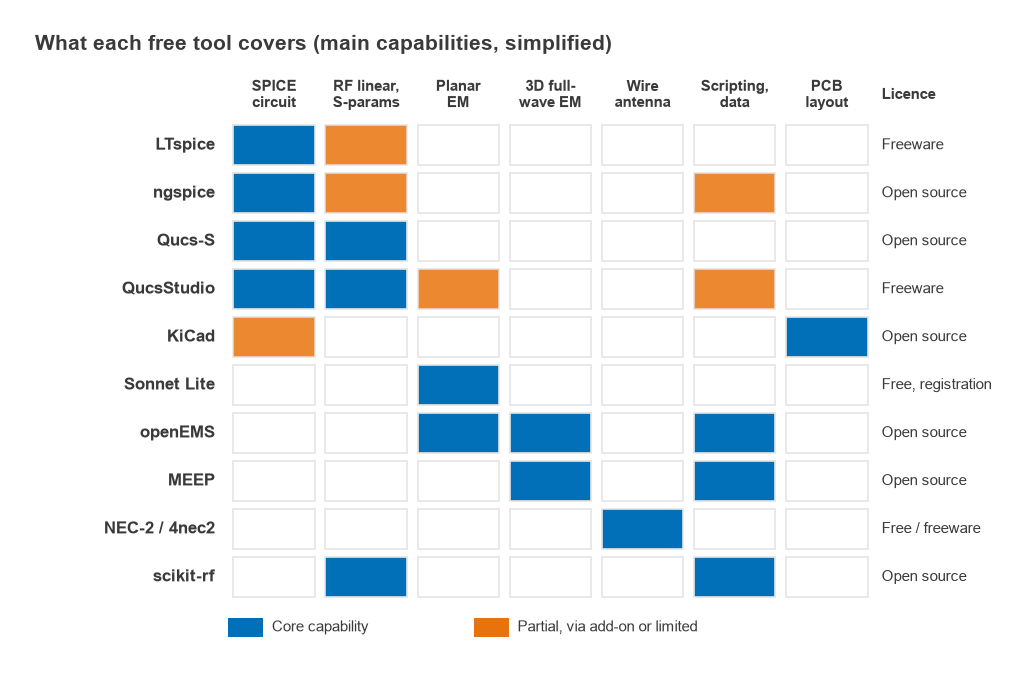
| Tool | Main use | Licence model | Main limit |
|---|---|---|---|
| Qucs-S | RF and SPICE circuit simulation | Open source | No EM solver |
| QucsStudio | Circuit, system and PCB EM simulation | Freeware | Closed source, smaller community |
| ngspice / LTspice | SPICE transient and AC | Open source / freeware | Not RF-native |
| Sonnet Lite | Planar EM | Free with registration | Memory cap |
| openEMS | 3D full-wave FDTD | Open source | Script-based modelling |
| MEEP | 3D full-wave FDTD | Open source | Photonics-oriented |
| NEC-2 / 4nec2 | Wire antennas | Free | Wires only |
| scikit-rf | Network data analysis | Open source | Library, no schematic |
| KiCad | Schematic and PCB layout | Open source | No RF simulation |
Worked example: checking a filter with free tools
A third-order Butterworth low-pass filter with a 1 GHz cut-off in a 50 Ω system shows the kind of problem these tools handle. The normalised prototype values are g1 = 1, g2 = 2, g3 = 1. Scaling a shunt-C, series-L, shunt-C ladder to 50 Ω and ωc = 2π × 109 rad/s gives
- C = g1/(ωcZ0) = 1/(6.283 × 109 × 50) = 3.18 pF
- L = g2Z0/ωc = 2 × 50/(6.283 × 109) = 15.92 nH
The Butterworth response is |S21|2 = 1/(1 + (f/fc)2n). At 1 GHz that gives −3.01 dB; at 2 GHz, 10log(1 + 26) = 18.13 dB of attenuation. Entering the ladder in Qucs-S, or cascading the three elements as ABCD matrices in scikit-rf, reproduces those numbers exactly, which is a useful first check that a tool has been set up correctly. The LC filter design page covers the method.
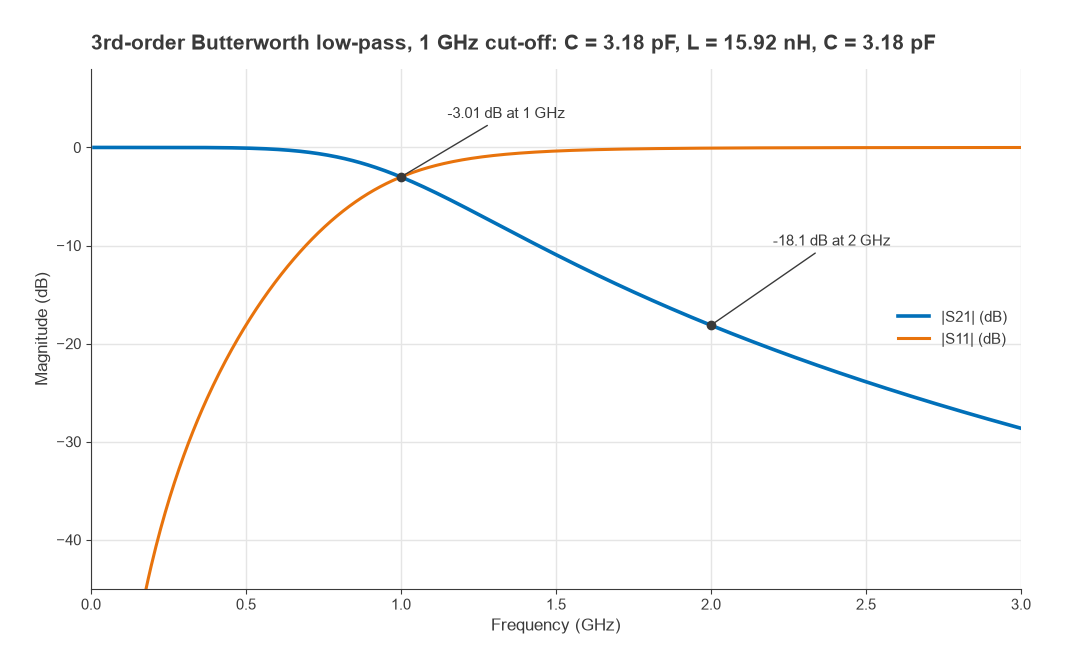
The ideal result is where the free workflow starts, not where it ends. Real 0402 capacitors and inductors have parasitics, and the pads and traces add their own. The next step is to replace the ideal elements with vendor S-parameter models in the circuit simulator, then model the layout in Sonnet Lite or openEMS. For an FDTD run up to 6 GHz on FR-4 (εr ≈ 4.4), the guided wavelength is 50 mm / √4.4 = 23.8 mm. A common rule of thumb limits cells to about λ/20, or roughly 1.2 mm, so a 60 × 40 × 10 mm box needs on the order of 14,000 cells before any refinement around fine features. Refinement around 0.2 mm gaps and thin substrates raises that count by orders of magnitude, which is why mesh planning dominates openEMS setup time.
A student workflow
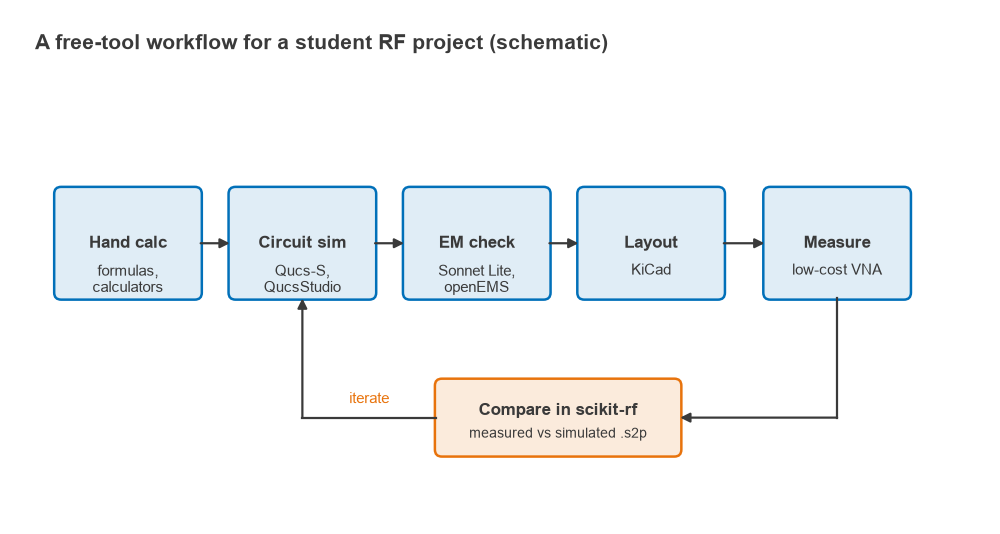
A typical student project, such as a filter, a matching network or a small LNA board, can be carried from idea to measurement with free tools alone:
- Size the design by hand and with the RF calculators: component values, trace widths, expected gain and noise.
- Simulate the circuit in Qucs-S or QucsStudio with ideal parts, then with vendor models.
- Check critical layout sections in Sonnet Lite (planar) or openEMS (3D), and feed the resulting S-parameters back into the circuit simulation.
- Lay out the board in KiCad using the trace widths from step 1.
- Measure the assembled board on a network analyzer and save Touchstone files. The VNA basics page covers calibration and setup.
- Load simulated and measured files into scikit-rf, overlay them and explain the differences.
The last step teaches the most. Differences between simulation and measurement point at parasitics, substrate tolerances or calibration errors, and learning to diagnose them is a large part of becoming an RF engineer. The RF design learning roadmap suggests projects to practise on.
Frequently asked questions
What is the best free RF simulation software?
It depends on the problem. For RF circuit and S-parameter work, Qucs-S (open source) and QucsStudio (freeware) are the strongest choices. For planar EM, Sonnet Lite is the most accessible; for 3D EM without a size cap, openEMS is the usual answer. Most projects use two or three tools together.
Can free tools replace commercial RF software?
For learning, small projects and many professional tasks, yes. Commercial suites still lead on integrated workflows, large device and foundry model libraries, nonlinear analysis of complex circuits and solver speed on big 3D models. The gap matters most for large products and RFIC work.
Is LTspice good for RF design?
It is very good for bias circuits, oscillators and anything best viewed in the time domain. For impedance matching, S-parameter analysis and noise figure of RF networks, a simulator with native RF analyses, such as Qucs-S, is more convenient.
Related topics
The RF design guide explains where simulation fits in the overall design flow. For a vendor-neutral view of the paid alternatives, see RF simulation software compared, and for definitions of terms used here, the wireless terms glossary.