

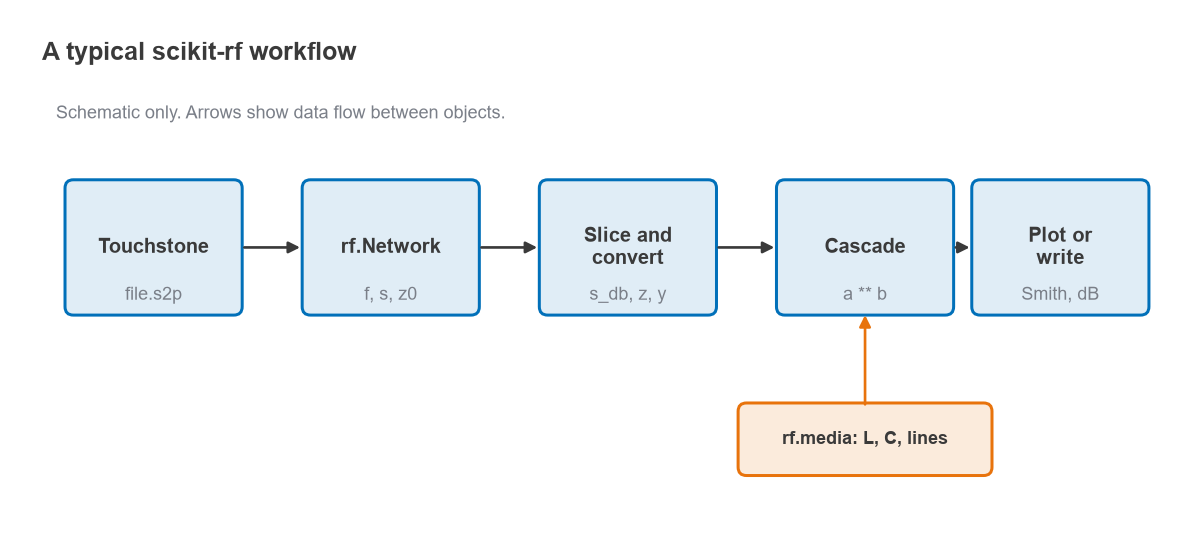
To analyze S-parameters in Python, install the open-source scikit-rf package, load a Touchstone file into an rf.Network object, and work on its frequency vector and complex S-matrix with NumPy. Python RF scripting is the use of a general programming language, rather than a closed simulator, to read, process, cascade and plot network data, which makes every step repeatable and easy to put under version control.
This how-to is part of the RF engineering tools and resources section of the RF design guide. It walks through the four tasks that cover most day-to-day work: loading a Touchstone file, plotting magnitude and Smith chart views, building networks from ideal components, and cascading them. A worked example designs a 1 GHz L-network in a few lines and checks its bandwidth. The numbers on this page were computed with an equivalent NumPy ABCD-matrix calculation and match scikit-rf 2.2.0 to the digits shown.
Why Script RF Analysis in Python
A vector network analyzer or a circuit simulator will happily display one measurement at a time. The trouble starts when there are fifty boards to compare, a fixture to remove from every file, or a pass/fail limit to check across temperature. A script does the same thing every time, documents exactly what was done, and can be rerun when the data changes. scikit-rf adds the RF-specific pieces that NumPy lacks: Touchstone parsing, conversions between S, Z, Y, ABCD and T parameters, network cascading, calibration algorithms and Smith chart plotting.
It is not a replacement for a full simulator. There is no harmonic balance engine and no layout-based electromagnetic solver. For those methods see harmonic balance vs transient simulation and the comparison of RF simulation software. For linear network work on measured or simulated data, though, a short script is often quicker than any GUI.
Step 1: Install and Load a Touchstone File
The package installs from the Python Package Index as scikit-rf and is imported as skrf. NumPy and Matplotlib come along as dependencies.
# run once in a terminal: pip install scikit-rf

import numpy as np
import skrf as rf

amp = rf.Network('amplifier.s2p')
print(amp)              # name, port count, frequency range, points
print(amp.f[:3])        # frequency vector in Hz
print(amp.s.shape)      # (N, 2, 2) complex S-matrix
print(amp.z0[0])        # reference impedance of each port
A Network holds three things: a Frequency object, a complex array s of shape (N, ports, ports), and the port reference impedances z0. Indexing follows Python’s zero-based convention, so S21 is amp.s[:, 1, 0]. The Touchstone .s2p format stores data as real/imaginary, magnitude/angle or dB/angle, and the parser converts all three to complex numbers on load. Derived views are available as attributes: s_db, s_mag, s_deg, and the full z, y and a (ABCD) matrices.
Frequency slicing uses a string index, which is convenient for restricting a broadband measurement to the band of interest:
band = amp['2-3ghz']                    # sub-network from 2 to 3 GHz
gain_db = band.s_db[:, 1, 0]
print(gain_db.min(), gain_db.max())    # in-band gain flatness
vswr_in = (1 + band.s_mag[:, 0, 0]) / (1 - band.s_mag[:, 0, 0])
The last line is the usual relation VSWR = (1 + |Γ|) / (1 − |Γ|), described in more detail on the VSWR and return loss page.
Step 2: Plot Magnitude and Smith Chart Views
Every Network has plotting methods that wrap Matplotlib. The arguments m and n select the S-parameter, again zero-based.
import matplotlib.pyplot as plt

amp.plot_s_db(m=1, n=0)      # S21 in dB versus frequency
amp.plot_s_db(m=0, n=0)      # S11 in dB
plt.figure()
amp.plot_s_smith(m=0, n=0)   # S11 on a Smith chart
plt.show()
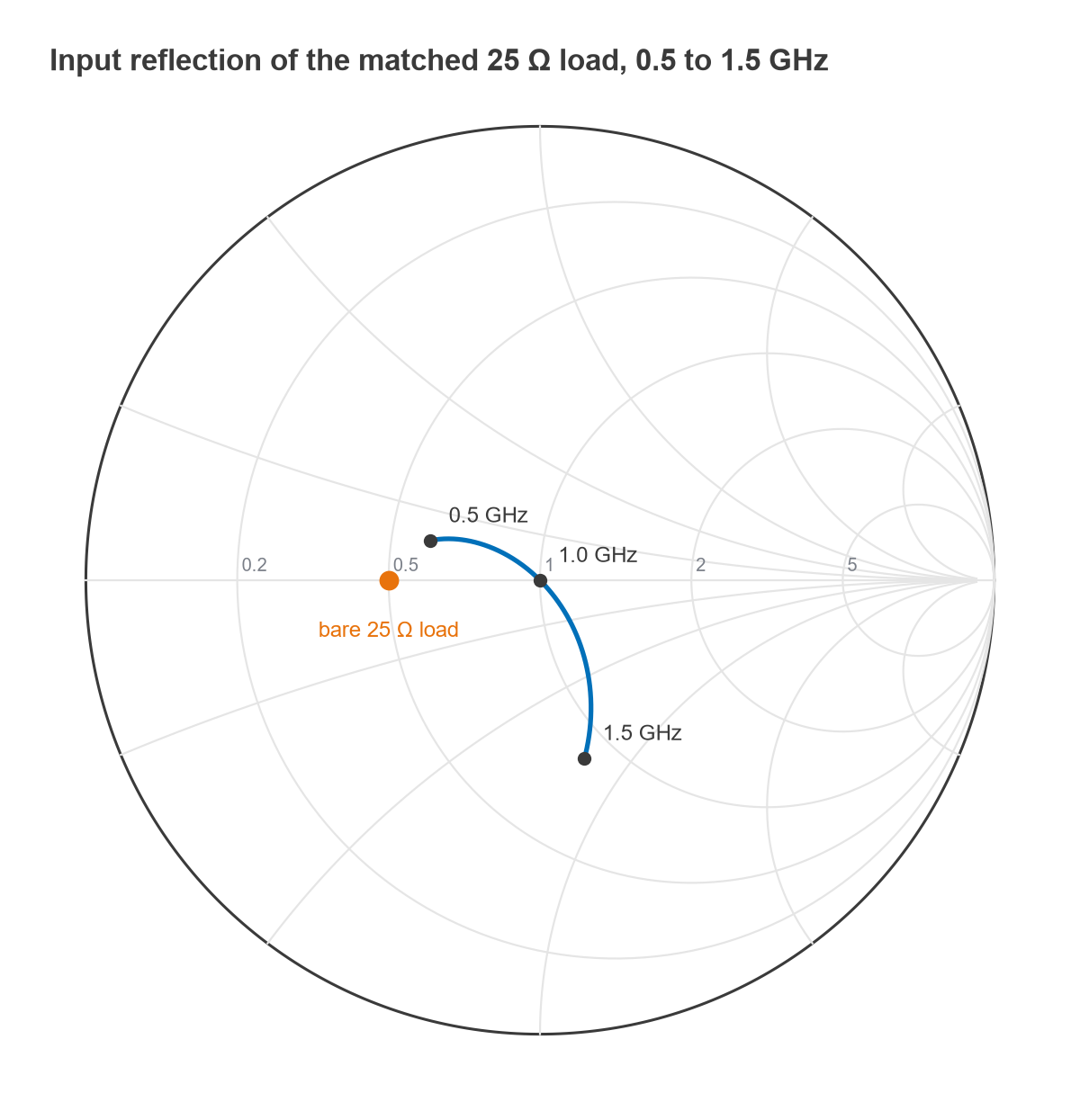
The Smith chart is the natural view for reflection data because a match, a frequency trajectory and the effect of each matching element are visible at a glance. If the chart itself is unfamiliar, the Smith chart guide covers how to read it. Because the plotting calls return ordinary Matplotlib axes, titles, limit lines and multiple traces are added the normal way, and figures can be saved straight into a test report.
Step 3: Build Networks from Components
Measured files are only half of the job. scikit-rf can also synthesize ideal networks on any frequency grid using a Media object, which represents a transmission medium with a known propagation constant and impedance. The simplest is DefinedGammaZ0, a lossless medium with a 50 Ω default reference.
freq = rf.Frequency(0.5, 1.5, 201, unit='GHz')
med  = rf.media.DefinedGammaZ0(freq)          # 50 ohm, lossless

L1 = med.inductor(3.979e-9)                   # series inductor, 2-port
C1 = med.shunt_capacitor(3.183e-12)           # shunt capacitor, 2-port
R1 = med.resistor(25)                         # series resistor, 2-port
gnd = med.short()                             # 1-port short
tl = med.line(90, unit='deg')                 # quarter-wave line at band centre
Each call returns an ordinary Network, so synthesized parts and measured files can be mixed freely. A series element Z has the ABCD matrix [[1, Z], [0, 1]] and a shunt admittance Y has [[1, 0], [Y, 1]]. A lossless line of electrical length θ and impedance Z0 has [[cos θ, jZ0 sin θ], [j sin θ / Z0, cos θ]]. Those three matrices are all that is needed to check the library’s results by hand.
Step 4: Cascade Networks
The ** operator connects port 2 of the left-hand network to port 1 of the right-hand one. Terminating a chain with a one-port, such as a load or a short, produces a one-port whose S11 is the input reflection. For longer chains, rf.network.cascade_list([a, b, c]) does the same thing.
Behind the operator is the cascade rule for two-ports. In ABCD form the total matrix is the ordered product,
[ABCD]total = [ABCD]1 · [ABCD]2 · … · [ABCD]n
and the input impedance of a chain terminated in ZL is Zin = (A ZL + B) / (C ZL + D). The reflection coefficient follows from Γ = (Zin − Z0) / (Zin + Z0). The equivalent rule in S-parameter terms uses transfer (T) parameters, which also multiply in order. The S-parameters hub explains the conversions. Cascading also runs in reverse: fixture.inv ** measured removes a known fixture from a measurement, which is the basis of the de-embedding techniques used with a vector network analyzer.
Worked Example: A 1 GHz L-Network in Python
Consider matching a 25 Ω resistive load to a 50 Ω source at 1 GHz with a lowpass L-network. Because the load resistance is lower than the source, the series element goes next to the load and the shunt element sits on the source side.
- Network Q: Q = √(RS/RL − 1) = √(50/25 − 1) = 1.0.
- Series reactance: XS = Q·RL = 25 Ω, so L = 25 / (2π × 109) = 3.979 nH.
- Shunt susceptance: B = Q/RS = 0.02 S, so C = 0.02 / (2π × 109) = 3.183 pF.
- Check at 1 GHz: the series inductor gives 25 + j25 Ω, whose admittance is 0.02 − j0.02 S. The shunt capacitor adds +j0.02 S, leaving 0.02 S, which is exactly 50 Ω.
In scikit-rf the whole design and its sweep take a few lines:
matched = C1 ** L1 ** R1 ** gnd      # shunt C, series L, 25 ohm load
rl = -matched.s_db[:, 0, 0]          # return loss in dB
f_ghz = matched.f / 1e9
in_band = f_ghz[rl >= 20]
print(in_band.min(), in_band.max())  # 20 dB return loss band
matched.plot_s_smith()
matched.write_touchstone('lmatch_25ohm')
The results from the equivalent ABCD calculation are listed below.
| Frequency (GHz) | Zin (Ω) | |Γ| | Return loss (dB) |
|---|---|---|---|
| 0.8 | 40.17 + j5.78 | 0.126 | 18.0 |
| 0.9 | 44.92 + j3.84 | 0.067 | 23.5 |
| 1.0 | 50.00 + j0.00 | 0.000 | perfect match |
| 1.1 | 54.52 − j6.30 | 0.074 | 22.6 |
| 1.2 | 57.03 − j15.05 | 0.154 | 16.3 |
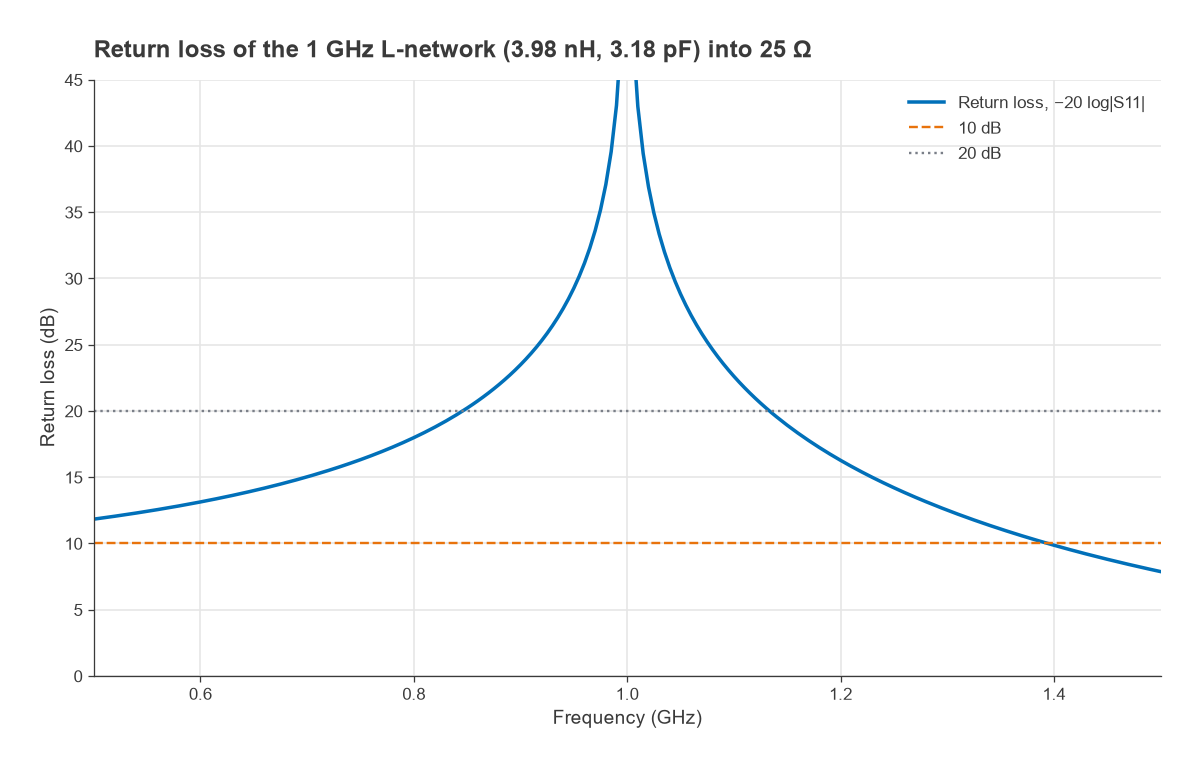
Return loss stays above 20 dB from 0.846 to 1.133 GHz, a span of 287 MHz or about 29 % of the centre frequency, and above 15 dB from 0.699 to 1.229 GHz. The response is not symmetric about 1 GHz because the element reactances scale with frequency in opposite directions. At low frequency the network becomes transparent and the input approaches the bare 25 Ω load, where |Γ| = 1/3 and the return loss is 9.5 dB. Wider bandwidth needs more sections or a lower Q per section, as discussed in broadband matching and the Bode-Fano limit.
Practical Tips for Larger Scripts
- Put networks on a common grid before cascading. Files from different instruments rarely share frequency points, and
ntwk.interpolate(freq)resamples one onto another. - Check reference impedances. Cascading assumes the facing ports share the same z0. A 75 Ω file cascaded with 50 Ω parts needs renormalizing first.
- Check stability and gain from measured transistor data. The Rollett K factor and maximum available gain follow directly from the S-matrix, as described in amplifier stability and the K factor and RF power gain definitions.
- Keep plots and limits in the same script that loads the data, so a report can be regenerated from raw files in one command.
- Validate against a hand calculation. The three ABCD matrices above are enough to check any ladder network to many decimal places.
Frequently Asked Questions
How do I analyze S-parameters in Python?
Load the Touchstone file with rf.Network('file.s2p'), then use the s, s_db and z arrays for calculations and the plot_s_db and plot_s_smith methods for plots. The S-matrix is a NumPy array, so any NumPy or SciPy function can be applied to it.
How do I cascade two networks in scikit-rf?
Use a ** b, which connects port 2 of a to port 1 of b, or rf.network.cascade_list for a longer chain. Both networks must share the same frequency points and facing port impedances.
Can scikit-rf replace a circuit simulator?
For linear network analysis, fixture removal, calibration and data processing it often can. It does not perform nonlinear harmonic balance, transient or electromagnetic simulation, so those still need a dedicated tool. Many engineers use both: the simulator for design and Python for post-processing and measurement comparison.
Why is S21 at index [1, 0]?
Python arrays are zero-indexed, so port 1 is index 0 and port 2 is index 1. S21, the transmission from port 1 to port 2, is therefore s[:, 1, 0].
Related Topics
The tools and resources hub lists the other software pages, including free RF design software and the RF calculators. For the theory behind the data, see S-parameters, Touchstone files and the impedance matching calculator. Measurement-side context is in measuring radio performance.