

A Touchstone file is a plain-text format for storing the network parameters of an N-port, most often S-parameters, as a table of complex values against frequency. To read an .s2p file, find the option line that starts with “#” to learn the frequency unit, parameter type, number format and reference impedance, then read each data line as one frequency followed by S11, S21, S12 and S22, each written as a pair of numbers.
Almost every vector network analyzer, circuit simulator and EM solver reads and writes Touchstone, so it is the normal way to pass measured or simulated S-parameters between tools and companies. This page explains the file structure, the three number formats, the ordering rules that catch people out, and how to use vendor data in simulation without being misled by it.
File Structure at a Glance
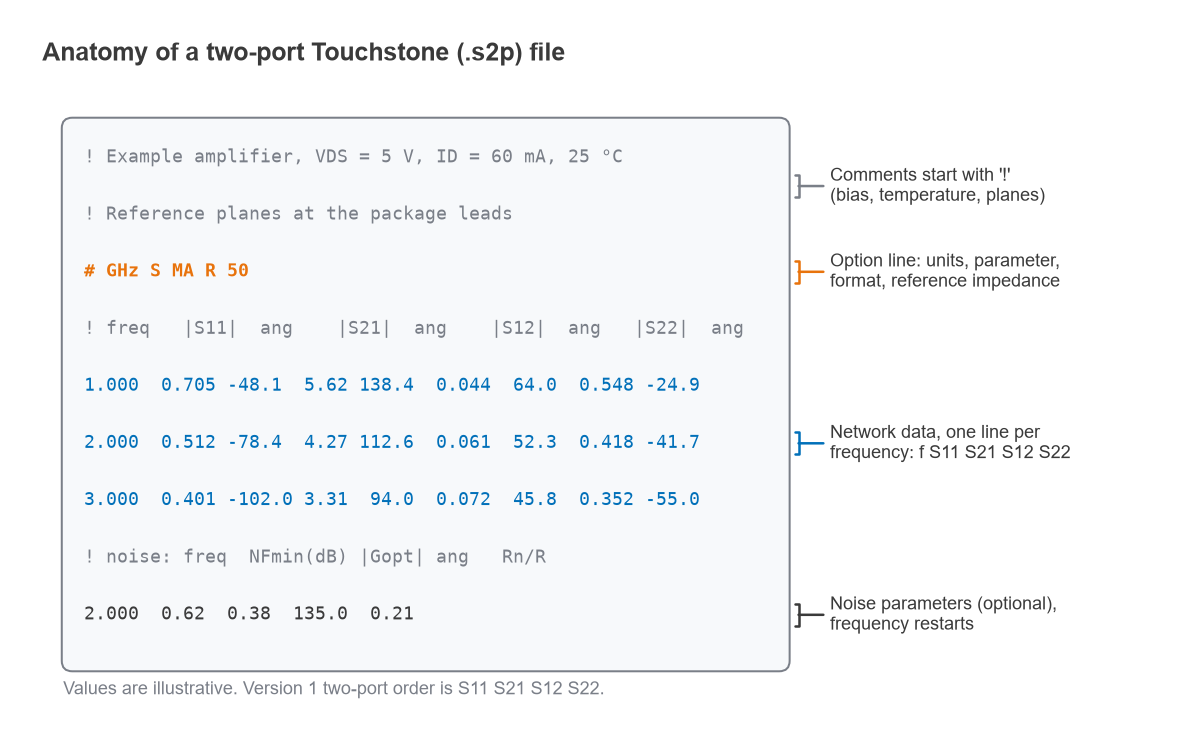
The file extension carries the port count: .s1p for a one-port such as an antenna or a termination, .s2p for a two-port, .s3p for a three-port and so on up to .s4p for a differential pair or a coupler. A version 1 file contains only three kinds of line:
- Comment lines begin with an exclamation mark. Anything after “!” is ignored by the parser, so vendors use comments to record the part, bias point, temperature, fixture and reference planes. Comments can also follow data on the same line.
- The option line begins with “#” and appears once, before the data. It tells the reader how to interpret every number that follows.
- Data lines hold one frequency point each for a one-port or two-port, with the frequency first and then the parameter values as pairs of numbers.
Two-port files may also carry a block of noise parameters after the S-parameter data. Frequencies within each block must increase, so the parser recognises the start of the noise block when the frequency drops back to a value at or below the last network frequency.
The Option Line
The option line has the general form:
# <frequency unit> <parameter> <format> R <n>
- Frequency unit: Hz, kHz, MHz or GHz. A frequency written as 2.000 means 2 GHz only if the unit is GHz.
- Parameter: S, Y, Z, H or G. S-parameters are by far the most common. In version 1 files, Y and Z data are normalised to the reference resistance.
- Format: MA (linear magnitude and angle), DB (magnitude in dB and angle) or RI (real and imaginary parts). Angles are in degrees.
- Reference resistance: “R 50” sets a 50 Ω reference for all ports. S-parameters only have meaning relative to this impedance.
The keywords are not case sensitive, may appear in any order, and any that are left out take default values: GHz, S, MA and R 50. A file whose option line is simply “#” is therefore read as S-parameters in magnitude-angle form against a 50 Ω reference with frequencies in GHz. Getting the unit wrong is the most common reading error; a filter that appears to work at 2 MHz instead of 2 GHz usually traces back to a missing or edited option line.
MA, DB and RI Number Formats
Each complex parameter is written as two numbers. The three formats describe the same value S = |S|ejθ = a + jb in different ways:
- MA: |S| and θ in degrees.
- DB: 20 log10|S| and θ in degrees. Note the factor 20, because S-parameters are ratios of wave amplitudes, not powers.
- RI: a = |S| cos θ and b = |S| sin θ.
Conversion back from RI uses |S| = √(a2 + b2) and θ = atan2(b, a). No format is inherently more accurate. DB makes gain and return loss easy to read by eye, RI avoids any ambiguity about phase wrapping, and MA is the default.
Data Order for Two-Port and Multi-Port Files
For a two-port version 1 file, each data line reads:
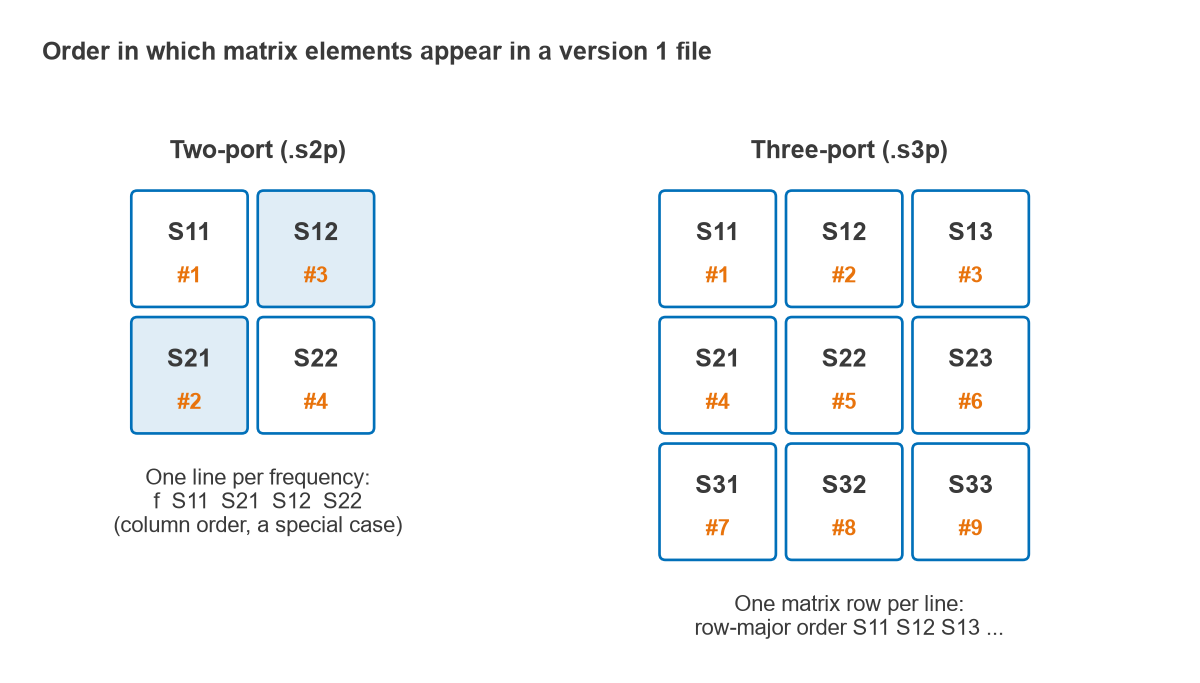
f S11 S21 S12 S22
The forward transmission S21 comes before the reverse transmission S12. This is column order, and it is a special case kept from the original format. Files with three or more ports switch to row order: each row of the matrix is written on its own line (wrapping onto further lines when there are more than four ports, since a line holds at most four pairs), giving S11 S12 S13 on the first line, S21 S22 S23 on the second, and so on. Code that reads .s2p and .s4p files with the same loop will swap S21 and S12 in one of them unless it handles the two-port case separately. A forward gain that looks like a large loss is the usual symptom.
Version 2.0 of the specification, maintained by the IBIS Open Forum, adds bracketed keywords such as [Version], [Number of Ports], [Two-Port Data Order] (12_21 or 21_12), [Number of Frequencies], [Reference] for a different reference impedance on each port, [Matrix Format] for storing only the upper or lower triangle of a symmetric matrix, and [Network Data] and [Noise Data] markers. Version 2 files often use the .ts extension, and older readers may reject the new keywords.
How to Read an .s2p File Step by Step
- Read the comment lines first. They usually state the bias point, temperature, test fixture and where the reference planes are.
- Decode the option line: frequency unit, parameter type, format and reference impedance.
- Take one data line and split it into the frequency plus four pairs in the order S11, S21, S12, S22.
- Convert each pair to a complex number using the stated format.
- Derive the quantities needed: gain from S21, input and output match from S11 and S22, isolation from S12, stability from all four.
- Check where the frequency drops back. Any lines after that point are noise parameters, not S-parameters.
Worked Example: Decoding One Data Line
Take an illustrative amplifier file with the option line “# GHz S MA R 50” and this data line:
2.000 0.512 -78.4 4.27 112.6 0.061 52.3 0.418 -41.7
The frequency is 2 GHz. S11 = 0.512∠−78.4°, S21 = 4.27∠112.6°, S12 = 0.061∠52.3° and S22 = 0.418∠−41.7°. The derived figures, checked numerically, are:
| Quantity | Formula | Value |
|---|---|---|
| S11 in RI form | 0.512 cos(−78.4°), 0.512 sin(−78.4°) | 0.1030 − j0.5015 |
| |S11| in dB | 20 log10(0.512) | −5.81 dB |
| Input return loss | −20 log10|S11| | 5.81 dB |
| Input VSWR | (1 + |S11|)/(1 − |S11|) | 3.10 |
| Input impedance | 50(1 + S11)/(1 − S11) | 34.9 − j47.5 Ω |
| Gain |S21|2 in 50 Ω | 20 log10(4.27) | 12.61 dB |
| Reverse isolation | −20 log10(0.061) | 24.29 dB |
| |S22| in dB | 20 log10(0.418) | −7.58 dB |
| |Δ| = |S11S22 − S12S21| | complex product | 0.291 |
| Rollett factor K | (1 − |S11|2 − |S22|2 + |Δ|2)/(2|S12S21|) | 1.24 |
With K > 1 and |Δ| < 1, the device is unconditionally stable at this frequency, as explained on the K-factor and stability page. The 12.61 dB figure is the gain between 50 Ω terminations; matching both ports conjugately would give more, as covered under power gain definitions.
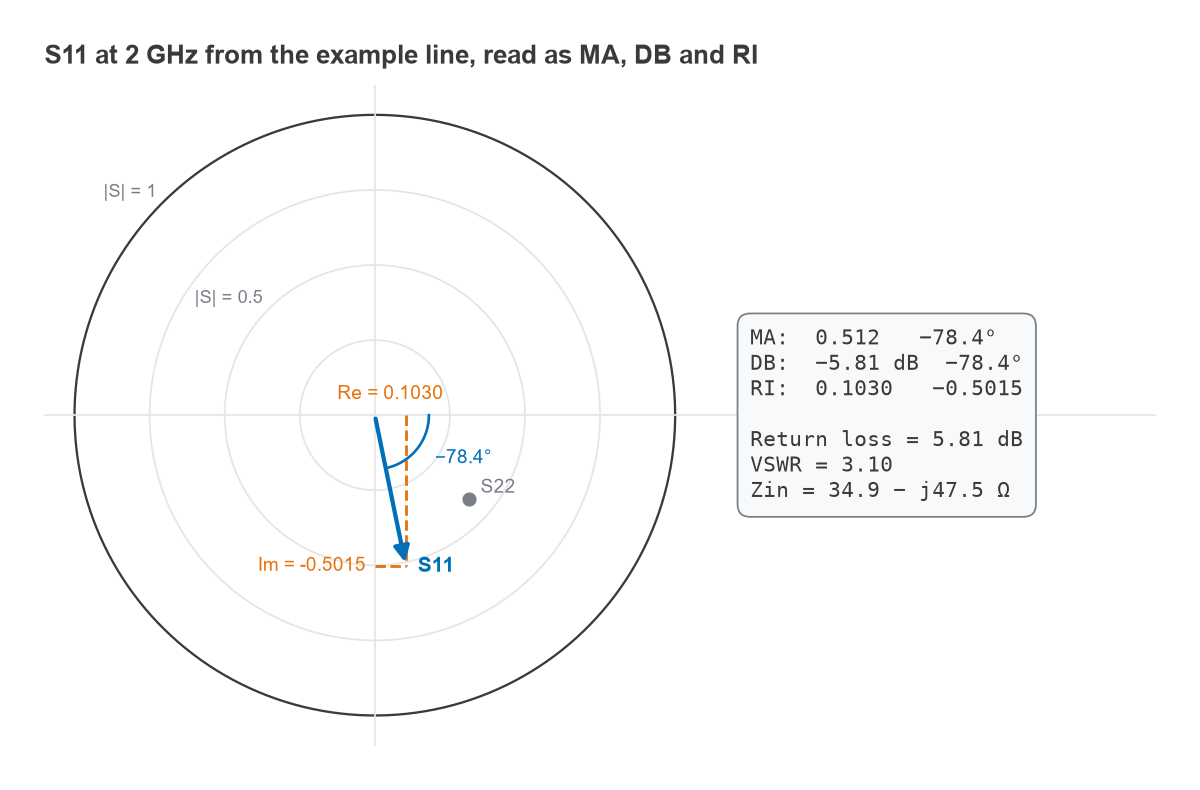
The same line written in DB format reads 2.000 -5.81 -78.4 12.61 112.6 -24.29 52.3 -7.58 -41.7, and in RI format 2.000 0.1030 -0.5015 -1.6409 3.9421 0.0373 0.0483 0.3121 -0.2781. All three describe exactly the same device.
Noise Parameters in .s2p Files
Transistor and LNA files often end with noise data, one line per frequency:
f NFmin(dB) |Γopt| ∠Γopt Rn/R
NFmin is the minimum noise figure, Γopt is the source reflection coefficient that achieves it (always given as magnitude and angle), and Rn is the equivalent noise resistance normalised to the reference resistance. With these four values a simulator can compute the noise figure for any source impedance using F = Fmin + (4rn|Γs − Γopt|2)/((1 − |Γs|2)|1 + Γopt|2), with rn = Rn/R. This is the basis of LNA design and of the noise figure trade-off against input match. A noise block measured at one bias point is only valid at that bias.
Using Vendor S-Parameters in Simulation
Dropping a vendor file into a schematic is simple. Getting a result that matches hardware takes more care, because the file describes one specific measurement setup.
- Bias and temperature. Active device data apply only at the stated supply voltage, current and temperature. Pick the file that matches the intended operating point, or interpolate between files with caution.
- Reference planes. The comments should say where the measurement was referenced: the package leads, the edge of a test fixture, or the device pads after de-embedding. Anything between those planes and the real board, such as pads, vias and line lengths, must be modelled separately.
- Mounting and grounding. A capacitor resonates at a slightly different frequency on a different footprint, and source or emitter grounding vias change transistor gain and stability.
- Frequency range. Simulators extrapolate outside the file’s range, often by holding the last value constant. Stability checks need data well beyond the operating band, and transient or time-domain analysis needs a sensible DC point.
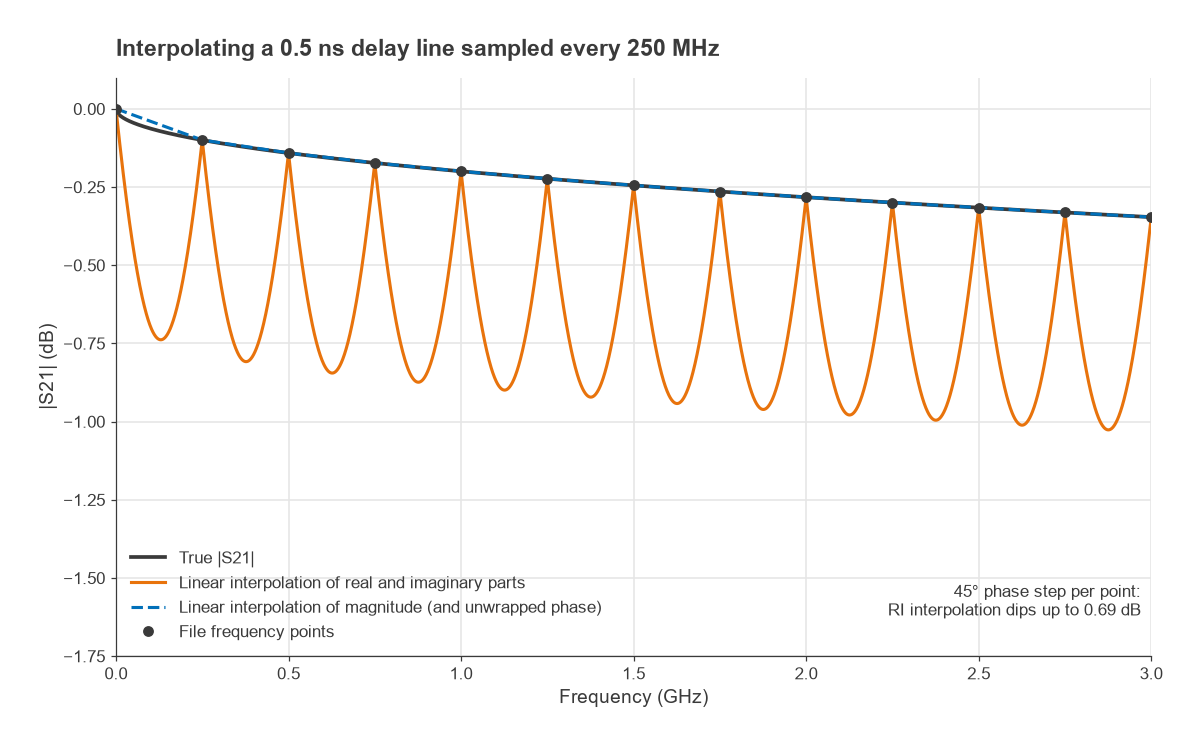
- Point density and interpolation. Between file points the simulator interpolates. Sparse data on a long electrical path rotate the phase quickly from point to point, and interpolating real and imaginary parts linearly then underestimates the magnitude, as Figure 4 shows.
- Small-signal only. S-parameters do not predict compression, intermodulation or efficiency; those need a nonlinear model and harmonic balance simulation.
- Passivity. Data for a passive part should never show gain: the largest singular value of the S matrix must stay at or below 1. Small violations from measurement noise can make time-domain results unstable.
Interpolation error in practice
Consider a matched line with a delay of τ = 0.5 ns, sampled every 250 MHz. The phase of S21 changes by 360° × 0.25 GHz × 0.5 ns = 45° between file points. Linear interpolation of the real and imaginary parts draws a straight chord between two points on a circle, so halfway between samples the magnitude falls by a factor cos(22.5°) = 0.924, which is 0.69 dB. Interpolating magnitude and unwrapped phase follows the true response. The cures are denser frequency points, magnitude-phase interpolation where the simulator offers it, or removing the known delay before interpolating.
Working with Touchstone Files in Software
A library handles the edge cases of parsing: trailing comments, wrapped rows, version 2 keywords and noise blocks. The open-source scikit-rf package for Python reads and writes all of these, as covered in Python for RF with scikit-rf. On the bench, a vector network analyzer saves Touchstone directly after calibration, and an EM simulator exports the same format, so measured and simulated results can be overlaid in any tool. Differential and coupled structures are usually stored as .s4p files and converted to mixed-mode S-parameters after loading.
When writing files, state the source, bias, temperature and reference planes in the comments, keep four or five significant digits so small values such as S12 survive, and always write the option line explicitly.
Frequently Asked Questions
How do you read an .s2p file?
Start with the option line beginning with “#”, which gives the frequency unit, parameter type, format and reference impedance. Each following data line holds a frequency and four pairs of numbers in the order S11, S21, S12, S22. Convert each pair to a complex value using the stated MA, DB or RI format.
Why is S21 before S12 in a two-port file?
It is a convention inherited from the original format, which lists the two-port matrix in column order. Files with three or more ports use row order instead. Version 2 files can state the order explicitly with the [Two-Port Data Order] keyword.
What does R 50 mean in the option line?
It sets the reference impedance to 50 Ω for every port. The S-parameter values are only correct relative to that impedance; to use the data in a 75 Ω system, the matrix must be renormalised rather than read as is.
Related Topics
The S-parameters hub explains the quantities stored in these files, and the Smith chart article shows how to plot reflection data. VSWR and return loss covers the match figures derived from S11, and measuring radio performance places S-parameter files within a wider test flow. All of these sit within the RF design guide.