

EM simulation is the numerical solution of Maxwell’s equations for a specific geometry and set of materials, used in RF design to predict S-parameters, fields and radiation that circuit models cannot capture. A 2.5D solver handles planar metal in infinite stacked layers and is fast; a 3D solver models arbitrary shapes such as connectors, finite boards and enclosures at a higher computational cost.
Circuit simulators work with idealised elements and fitted models, so they cannot know how a particular via, bend or ground cut behaves at 10 GHz. An EM solver starts from the physical layout instead, which makes it the standard tool for antennas, transitions, filters and packages. This page explains the three main numerical methods, the difference between 2.5D and 3D tools, and the meshing, port and boundary choices that determine whether a simulation can be trusted. Commercial and free tools are compared separately in RF simulation software and free RF design software.
What an EM Solver Does
Every full-wave solver divides the geometry into small pieces, the mesh, and approximates the unknown field or current on each piece with simple basis functions. Maxwell’s equations and the boundary conditions then become a large system of equations. Solving it gives the fields, from which the solver extracts port voltages and currents, and hence S-parameters, usually exported as Touchstone files. The methods differ in what they mesh, whether they work in the frequency or the time domain, and what sort of matrix they produce.
Method of Moments vs FEM vs FDTD
Method of moments (MoM)
MoM solves an integral equation for the currents on metal surfaces. Only the conductors are meshed; the surrounding medium, including a layered dielectric stack, is built into a Green’s function, so a microstrip filter needs only its copper meshed and radiation is included without an artificial boundary. The cost is a dense matrix. With N unknowns the matrix holds N2 complex entries, and direct solution time grows roughly as N3. At 16 bytes per double-precision complex entry, 10,000 unknowns need 1.6 GB and 20,000 need 6.4 GB.
Finite element method (FEM)
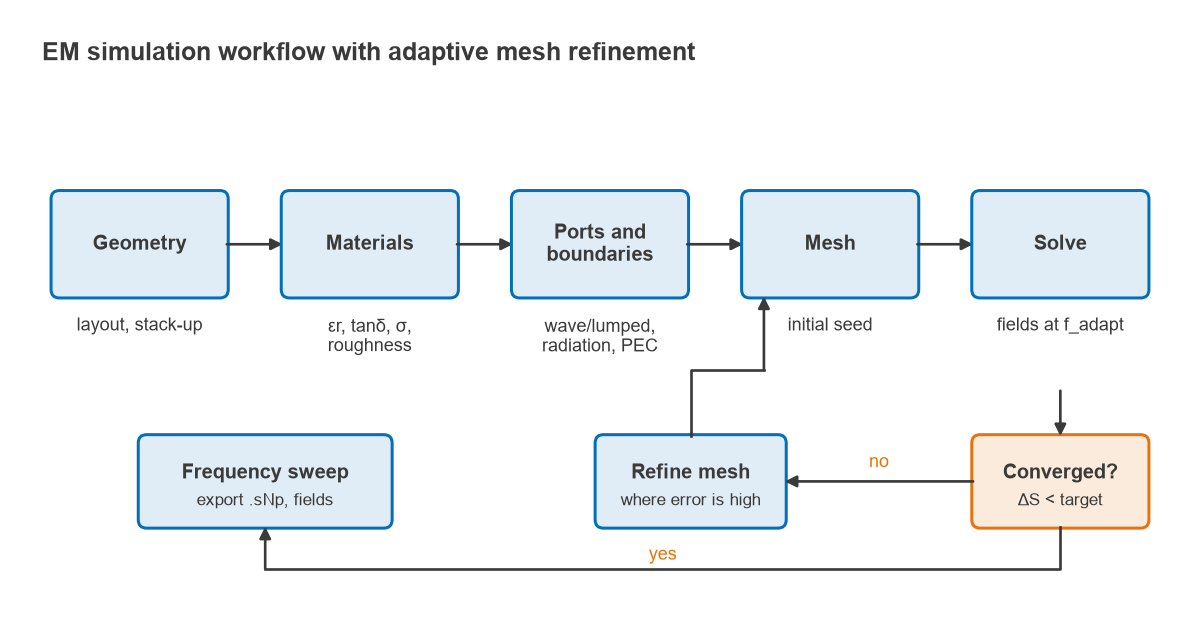
FEM solves the wave equation in differential form throughout a volume filled with tetrahedra, so curved surfaces, finite boards and mixed materials are handled naturally. Each element couples only to its neighbours, so the matrix is sparse. FEM solves one frequency at a time and uses interpolation or model-order reduction to sweep a band. Open space needs an absorbing boundary or a perfectly matched layer (PML). Adaptive mesh refinement, in which the solver estimates its own error and refines where it is highest, is a particular strength.
Finite-difference time-domain (FDTD)
FDTD discretises space into a grid of rectangular cells, the Yee lattice, and steps the electric and magnetic fields forward in time. There is no matrix to solve: each update uses only neighbouring values, so memory grows linearly with the number of cells and the method parallelises well. A short pulse excites the structure, and a Fourier transform of the port signals gives a broadband response from one run. The finite integration technique (FIT) is closely related. The time step must satisfy the Courant condition,
Δt ≤ 1 / ( c √(1/Δx2 + 1/Δy2 + 1/Δz2) )
so small cells force small time steps. A rectangular grid also approximates curved edges as staircases unless conformal techniques are used, and high-Q structures need long run times to ring down.
| Property | MoM | FEM | FDTD / FIT |
|---|---|---|---|
| Domain | Frequency | Frequency | Time |
| What is meshed | Metal surfaces | Whole volume (tetrahedra) | Whole volume (grid cells) |
| Matrix | Dense | Sparse | None (explicit stepping) |
| Open space | Built into Green’s function | Absorbing boundary or PML | Absorbing boundary or PML |
| Strengths | Planar circuits, wire antennas | Arbitrary 3D shapes, high-Q parts, adaptive mesh | Very wide bands, large problems, transients |
| Weaknesses | Large or volumetric problems | Many frequency points can be slow | Fine features and high Q raise run time |
2.5D vs 3D EM Simulation
The “2.5D” label describes planar MoM solvers that treat the board as a stack of dielectric layers extending to infinity sideways, with metal patterns on the layer interfaces and vias carrying vertical current between them. Fields are fully three-dimensional, but the geometry is restricted, hence the name. Some planar tools enclose the layers in a shielding box, which suits circuits in metal housings.
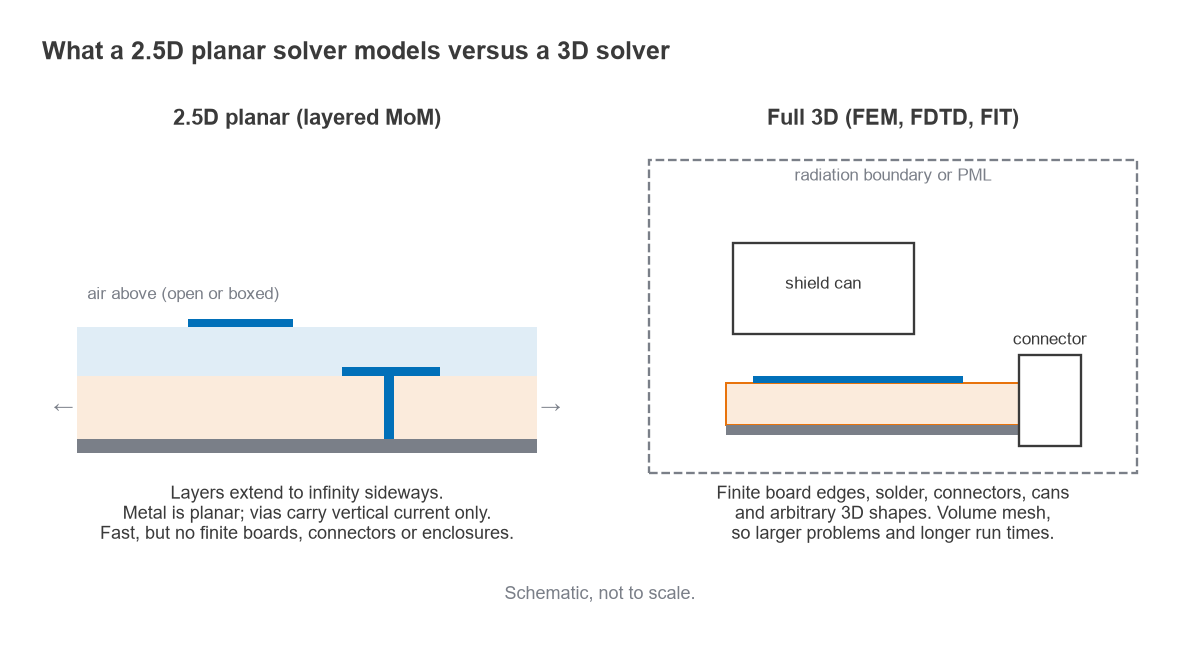
The restriction matters at board edges, connectors, wire bonds, shield cans and components with height. A 2.5D solver cannot represent a finite substrate or a coaxial launch, so its results for a PCB antenna near the board edge will be wrong regardless of mesh density. Full 3D solvers model those features directly. A practical rule: use 2.5D for planar circuits such as microstrip filters, couplers and matching networks, and 3D when the structure has meaningful thickness, finite edges or non-planar parts.
Meshing and Convergence
Two requirements set the cell size. The first is wavelength, with common guidance of λ/10 to λ/20 per cell for time-domain grids, using the wavelength in the densest dielectric at the highest frequency. The second is geometry: narrow gaps, thin substrates and strip edges, where current crowds, need several cells across them. On most RF boards the geometry requirement is the stricter one.
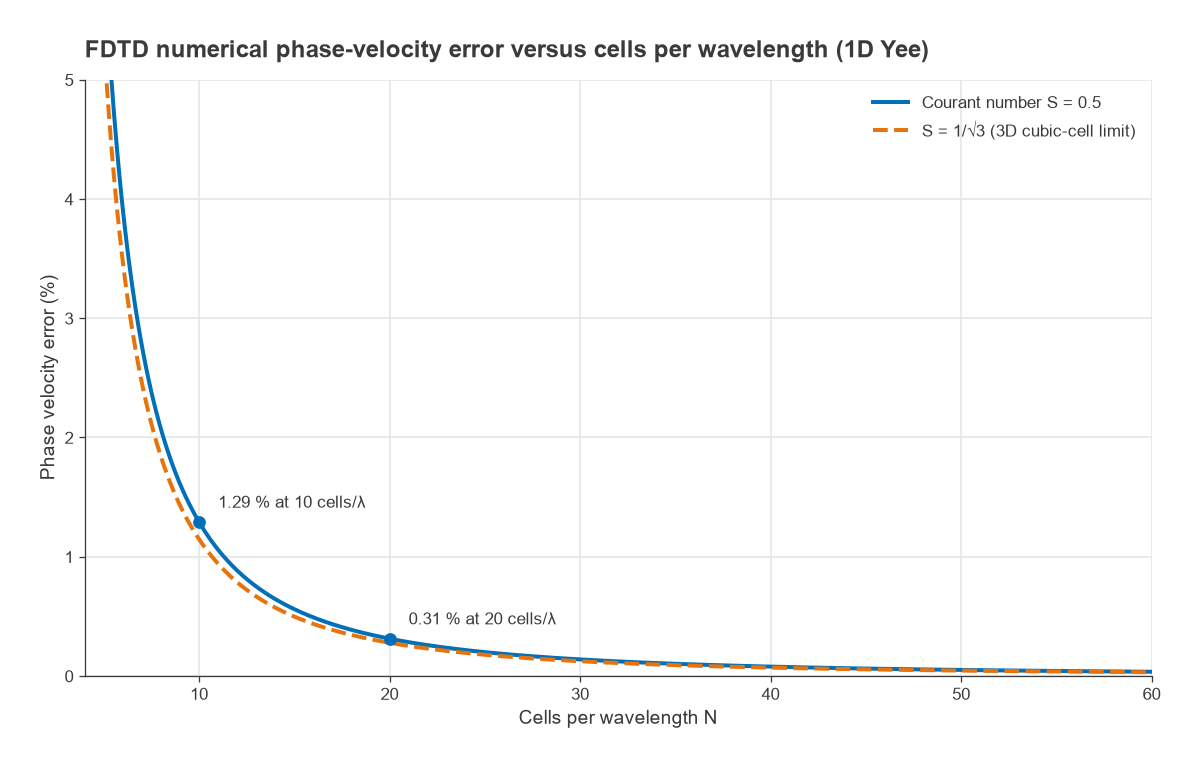
The wavelength requirement exists because a discrete grid propagates waves at a slightly wrong speed, an error called numerical dispersion. For the one-dimensional Yee scheme with Courant number S = cΔt/Δx and N cells per wavelength, the numerical wavenumber k̃ satisfies
k̃Δx = 2 arcsin( sin(πS/N) / S )
and the phase-velocity error is k̃/k − 1. The error falls roughly as 1/N2, so halving the cell size cuts it by about a factor of four.
Convergence is the practical test. FEM tools refine the mesh in passes and stop when the largest change in any S-parameter between passes falls below a target, often set around 0.01 to 0.02 in magnitude. Time-domain tools can be checked the same way by repeating the run with a finer grid. A result that changes noticeably between meshes is not yet an answer.
Ports and Boundaries
Wave ports and lumped ports
A wave port is a 2D aperture where the line enters the model. The solver first computes the field pattern and impedance of the line’s propagating modes on that cross-section, then launches and absorbs exactly those modes. Wave ports give clean, well-defined reference planes and allow de-embedding of extra line length. They must be large enough to contain the line’s field without cutting it off, but not so large that they support unwanted waveguide modes. Commonly quoted guidance for microstrip is a width of about 5 to 10 trace widths and a height of about 5 to 10 substrate heights: for a 0.56 mm trace on 0.254 mm, a port 2.8 to 5.6 mm wide and 1.3 to 2.5 mm tall. The port impedance reported by the solver should be close to the expected line impedance.
A lumped or discrete port is a small source with a defined impedance placed across a gap, such as between a trace and ground or across a component pad. It is convenient inside a structure, for example to represent a chip capacitor or an IC pin, but it adds its own small parasitic inductance and has a less precisely defined reference plane. It must be electrically small, typically well under a tenth of a wavelength. Port reference planes can be moved afterwards with de-embedding.
Boundary conditions
- Perfect electric conductor (PEC): a metal wall, also used on a symmetry plane where the electric field is normal to it.
- Perfect magnetic conductor (PMC): a symmetry plane where the electric field is tangential. A correct symmetry plane halves the model.
- Radiation (absorbing) boundary: approximates open space, commonly placed about a quarter wavelength at the lowest frequency from radiating parts.
- Perfectly matched layer (PML): a lossy layer that absorbs waves arriving at many angles, more accurate for antennas.
Materials matter as much as the mesh. Specify εr and tanδ at the operating frequency, ideally with a causal wideband model, and include copper thickness, roughness and solder mask at higher frequencies; the stripline and coplanar waveguide pages show how strongly thickness and gaps affect impedance.
How to Set Up an EM Simulation
- Simplify the geometry to the region that matters, keeping enough feed line on each port for the fields to settle.
- Choose the solver type: 2.5D for planar layered circuits, 3D for anything with finite edges, connectors or enclosures.
- Assign materials with frequency-appropriate εr, tanδ, conductivity, thickness and roughness.
- Define ports, their reference impedance and any de-embedding distance.
- Set boundaries and the air region, using symmetry planes where the structure and excitation allow.
- Choose the highest frequency, the adaptive frequency and the convergence target, then mesh and solve.
- Confirm convergence and sanity-check the results before sweeping and exporting.
Worked Examples
Mesh convergence on a 50 Ω stripline
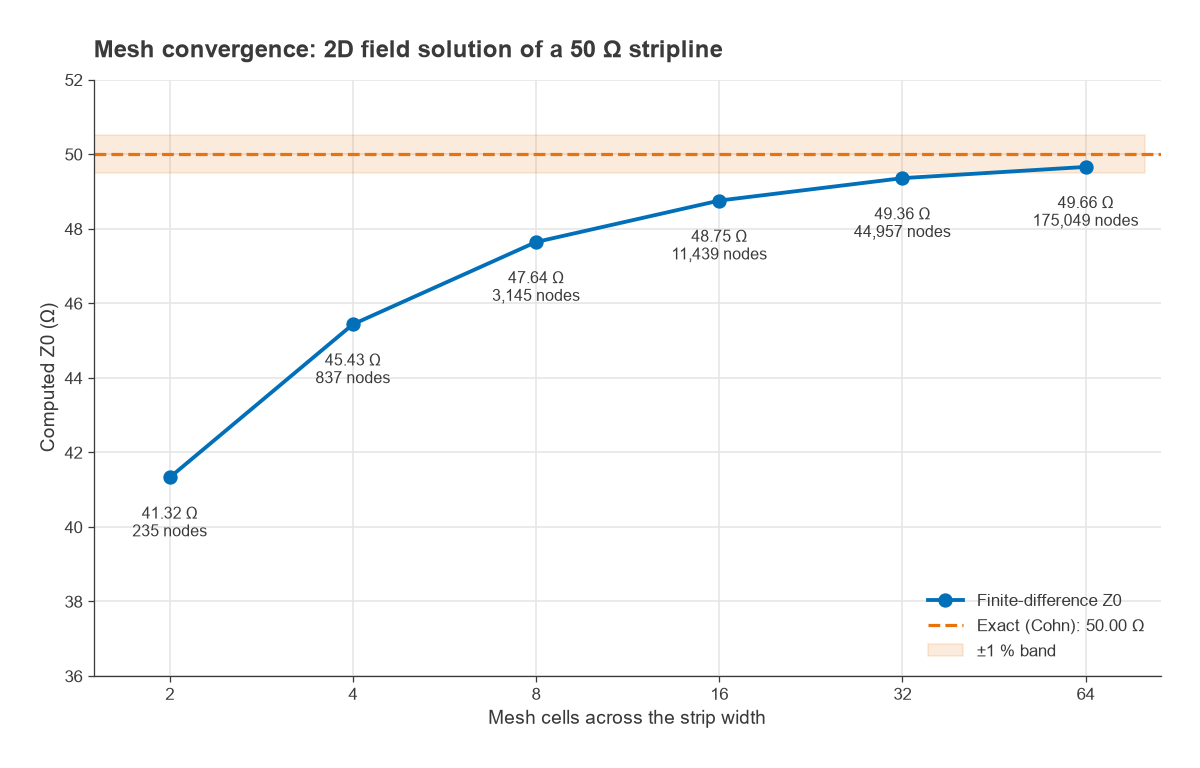
A 2D cross-section solver shows convergence clearly. Take a symmetric stripline with a zero-thickness strip, plane spacing 0.508 mm and εr = 3.66. The exact conformal-mapping result gives Z0 = 50.00 Ω at W = 0.278 mm. A finite-difference Laplace solution of the same cross-section, computing the capacitance from the stored field energy, gives:
| Cells across strip | Mesh nodes | Computed Z0 (Ω) | Error |
|---|---|---|---|
| 2 | 235 | 41.32 | −17.4 % |
| 4 | 837 | 45.43 | −9.1 % |
| 8 | 3,145 | 47.64 | −4.7 % |
| 16 | 11,439 | 48.75 | −2.5 % |
| 32 | 44,957 | 49.36 | −1.3 % |
| 64 | 175,049 | 49.66 | −0.7 % |
The error halves each time the cell size halves. That first-order behaviour comes from the field singularity at the sharp strip edge, and it is why solvers concentrate cells at conductor edges rather than refining uniformly. Because the error is so regular, Richardson extrapolation from the last two results, 2 × 49.66 − 49.36, gives 49.96 Ω, within 0.1 percent of the exact value. A coarse mesh with two cells across the strip would have predicted a line 17 percent low in impedance.
FDTD dispersion error and grid budget
With S = 0.5, the dispersion relation above gives a phase-velocity error of 1.29 percent at 10 cells per wavelength and 0.31 percent at 20. Over a line two wavelengths long, 720° of phase, that is a phase error of about 9.3° at 10 cells per wavelength and 2.2° at 20. For a filter or a phased-array feed, the finer grid is clearly needed.
Now size a time-domain run for a 50 × 30 × 6 mm region containing a board with εr = 3.66, simulated up to 10 GHz. The wavelength in the dielectric is 15.67 mm, so λ/20 is 0.78 mm. The geometry is stricter: to resolve a 0.56 mm trace and a 0.254 mm substrate, a uniform grid of Δx = Δy = 0.1 mm and Δz = 0.0635 mm (four cells through the substrate) is chosen. That gives 500 × 300 × 95 = 14.25 million cells. The Courant limit gives Δt = 0.158 ps, so 5 ns of simulated time needs about 31,700 time steps. A graded mesh that is fine only near the copper would cut the cell count several times over, which is why every practical FDTD tool uses one.
Checking and Using the Results
Before trusting any result, apply simple physical checks. A passive two-port must satisfy |S11|2 + |S21|2 ≤ 1, reciprocal structures without ferrites must give S21 = S12, and where a closed-form answer exists, such as the impedance of a straight line, the solver should reproduce it.
The exported S-parameters then go into a circuit simulator alongside active device models, where harmonic balance handles the nonlinear parts, or into Python scripts as described in Python for RF with scikit-rf. At millimetre-wave frequencies nearly every layout feature needs EM verification; see mmWave radio architectures and RF PCB layout.
Frequently Asked Questions
What is the difference between 2.5D and 3D EM simulation?
A 2.5D solver models planar metal on layers that extend to infinity sideways, with vertical vias between them. It is fast and accurate for planar circuits. A 3D solver models any shape, including finite boards, connectors and enclosures, at a higher cost in memory and time.
Which method is best for antennas?
Wire and planar antennas on large ground planes suit MoM. Antennas on finite boards or in housings suit FEM or FDTD, and very wideband antennas are often simulated in the time domain because one run covers the band.
How fine should the mesh be?
Fine enough that the result stops changing. As a starting point, use λ/10 to λ/20 in the densest dielectric and several cells across every narrow feature, then refine until the S-parameters converge to the required tolerance.
Related Topics
The RF engineering tools and resources hub collects the software pages, including RF simulation software and the RF calculators for quick checks before a full simulation. All of these belong to the wider RF design guide.